The search results panel shows tests based on the parameters entered in the search overlay.
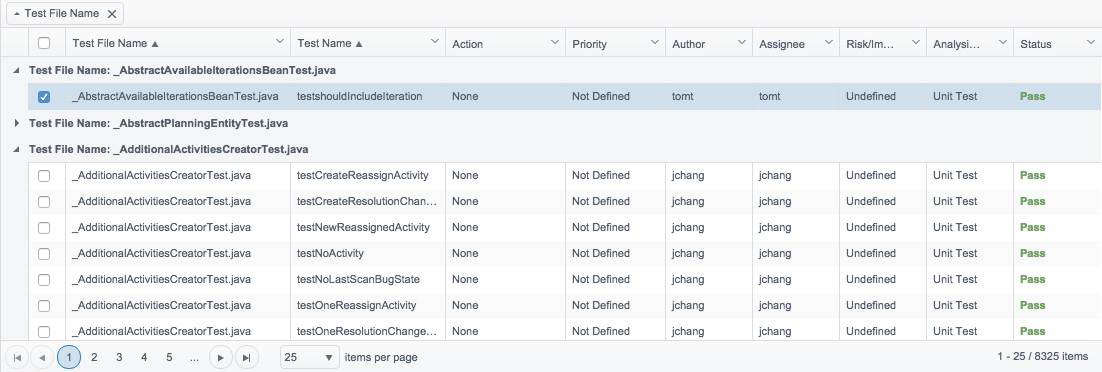
You can perform the following actions:
- Click on a row to view additional information in the actions panel; see Reviewing Test Failures.
- Click on a column header to sort results.
- Click and drag a column header to the area labeled Drag a column header and drop it here to group by that column to create grouped views of the search results. By default, the table is grouped by test file name.
Viewing Tests Executed in Different Environments
If your tests execute on different machines, you can add the Test Environment tab to the search results table so that you can view the results for each environment. See Navigating Explorer Views for additional information on filtering the results table.
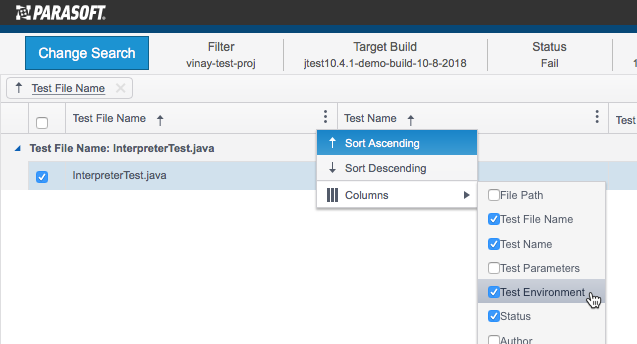
Tests in the build that have unique configuration identifiers (such as session tags) will appear under in the table with the test environment tag that was applied during test execution.

Refer to DTP Concepts for additional information about session tags, build IDs, and other metadata that enable DTP to organize and aggregate data.
