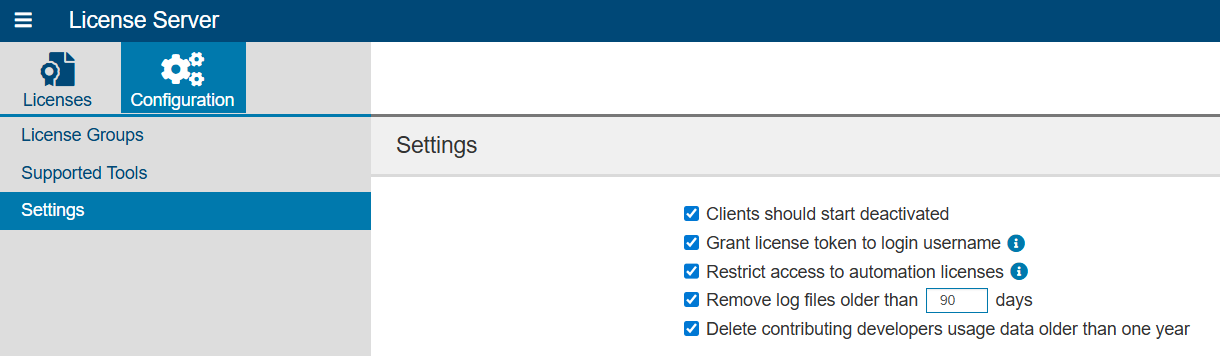
The following settings are available:
| Remove log files older than __ days | When enabled, specifies how many days (up to 365) that logs are stored before automatically being removed from the file system. When not enabled, logs are not automatically removed. This option is enabled by default. |
|---|---|
| Clients should start deactivated | Enabling this option forces connected Parasoft tools to start deactivated. See the Parasoft tool documentation settings for additional information. This option is enabled by default. |
| Grant license token to login username | When enabled and License Server is configured to require authentication, License Server will grant license tokens to the username used to log into License Server. When disabled, License Server grants license tokens to the OS username. In OIDC mode, the license token is always granted to the OIDC login username. This option is enabled by default. |
| Restrict access to automation licenses | When enabled, License Server will deny access to licenses with automation features unless those features are explicitly requested. See Licenses with Automation Feature for more information. This option is enabled by default. |
| Delete contributing developers usage data older than one year | When enabled, contributing developer usage data sent from Parasoft C/C++test CT and Parasoft C/C++test Standard is automatically deleted after one year. This option is enabled by default. |
By default, License Server sessions time out after 600 minutes of inactivity. You can change the timeout period to something that suits your needs. License Server and User Administration have their own settings.
To change the License Server session timeout:
<LSS_INSTALL_DIR>/app/tomcat/webapps/licenseserver/WEB-INF directory or, if you installed License Server to use your own Tomcat installation, in the <TOMCAT_INSTALL_DIR>/webapps/licenseserver/WEB-INF directory.<session-timeout> element and update the value, which is expressed in minutes.To change the User Administration session timeout:
<LSS_INSTALL_DIR>/data/conf directory or, if you installed License Server to use your own Tomcat installation, in the <TOMCAT_INSTALL_DIR>/webapps/pstsec/conf directory.<session-timeout> element and update the value, which is expressed in minutes. If the <session-timeout> element is not present, add it and set the value. Notes:
0 or -1 to disable session timeout so that sessions never time out.1, the session timeout will be 2 minutes.