The Parasoft C/C++test CT and Parasoft C/C++test Standard tools send metadata statistics about analyzed files, including the number of files analyzed and, if available, the URLs of associated Git repositories, to License Server. If you are using one of those tools, you can do either of the following in License Server:
- View a summary of this data, which will contain an easy-to-read report of files and Git repository metadata that were tested by your C/C++test tool.
- Download a zipped package containing the statistical JSON files collected from your C/C++test tool.
In both cases, you can specify the period of days covered.
Viewing or Downloading Statistical Data
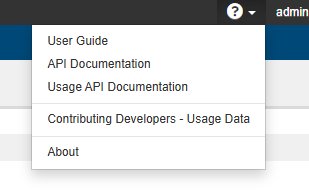
- Click the question mark icon in the upper-right corner and choose Contributing Developers - Usage Data.
- Specify the date range you would like information about. You can enter the dates manually or click in a date field and choose the data range from the calendars.
- To download a zipped package containing statistical JSON files collected by the License Server from your C/C++test tool, click Download Usage Data.
- The downloaded zip file includes folders for each day in the date range. Each folder contains JSON files for the specific day.
- To view a summarized report of files and Git repository metadata that were tested by your C/C++test tool, click View Usage Summary. If you don't want to show the names of the repositories in the report, enable Anonymize repository names.
