Parasoft SOAtest/Virtualize Server を使用するには、ライセンスが必要です。WAR ファイルがデプロイされたマシンにアクセスできる場合、サーバーを起動する前に、<SOAVIRT_HOME>/WEB-INF/config.properties ファイルを編集してライセンス設定を行うことができます。config.properties ファイルにアクセスできない場合、または自動化プロセスの一部としてサーバーを構成している場合、REST API を使ってライセンス設定を実施できます。このセクションの内容:
マシンロック ライセンスの使用
ローカル ライセンスを使用するには、次の設定を行います。
virtualize.license.use_network=false
virtualize.license.local.password=<password sent to you from Parasoft>

soatest.license.use_network=false
soatest.license.local.password=<password sent to you from Parasoft>
ライセンス設定の詳細については「サーバーの設定」を参照してください。詳細設定については「サーバーの詳細設定オプション」を参照してください。
License Server ライセンスの使用
License Server のライセンスを使用するには、次の設定を行います。
license.network.use.specified.server=true
license.network.connection.type=http
license.network.host=<hostname where License Server is deployed>
license.network.port=<port number for your License Server>

virtualize.license.use_network=true
virtualize.license.network.edition=performance_server_edition
virtualize.license.custom_edition_features=<comma-separated list of features>
virtualize.license.enabled=true

soatest.license.use_network=true
soatest.license.network.edition=server_edition
soatest.license.custom_edition_features=<comma-separated list of features>
soatest.license.enabled=true
組織で購入済みのライセンス タイプを把握するには、組織の Parasoft 担当者に問い合わせてください (例: server_edition)。 Custom Edition を使用している場合、少なくとも Virtualize の Service Enabled 機能あるいは SOAtest の Server API Enabled 機能を指定する必要があります。
license.network.use.specified.server=true
license.network.connection.type=http
license.network.host=<hostname where License Server is deployed>
license.network.port=<port number for your License Server>

virtualize.license.use_network=true
virtualize.license.network.edition=performance_server_edition
virtualize.license.custom_edition_features=<comma-separated list of features>
virtualize.license.enabled=true

soatest.license.enabled=false
license.network.use.specified.server=true
license.network.connection.type=http
license.network.host=<hostname where License Server is deployed>
license.network.port=<port number for your License Server>

virtualize.license.enabled=false

soatest.license.use_network=true
soatest.license.network.edition=server_edition
soatest.license.custom_edition_features=<comma-separated list of features>
soatest.license.enabled=true
詳細については「サーバーの設定」を参照してください。詳細設定については「サーバーの詳細設定オプション」を参照してください。
DTP ライセンスの使用
SOAtest および Virtualize Server を Parasoft DTP に接続して、ライセンスを取得できます。
license.network.use.specified.server=false
virtualize.license.use_network=true
soatest.license.use_network=true

dtp.server=<hostname where DTP is deployed>
dtp.port=<port number for your DTP deployment>
dtp.user=<username for account on DTP>
dtp.password=<password for account on DTP>
サーバー起動後のライセンス設定
REST API を使ってサーバーのライセンスを設定できます。また、API を使用して CTP への接続を構成することも可能です (サーバーの設定 の env.manager.* 設定を参照)。
- サーバーを起動して、
preferencesエンドポイントのドキュメントを開きます:http://<host>:<port>/soavirt/api/v6#!/preferences/preferencesPUT_config
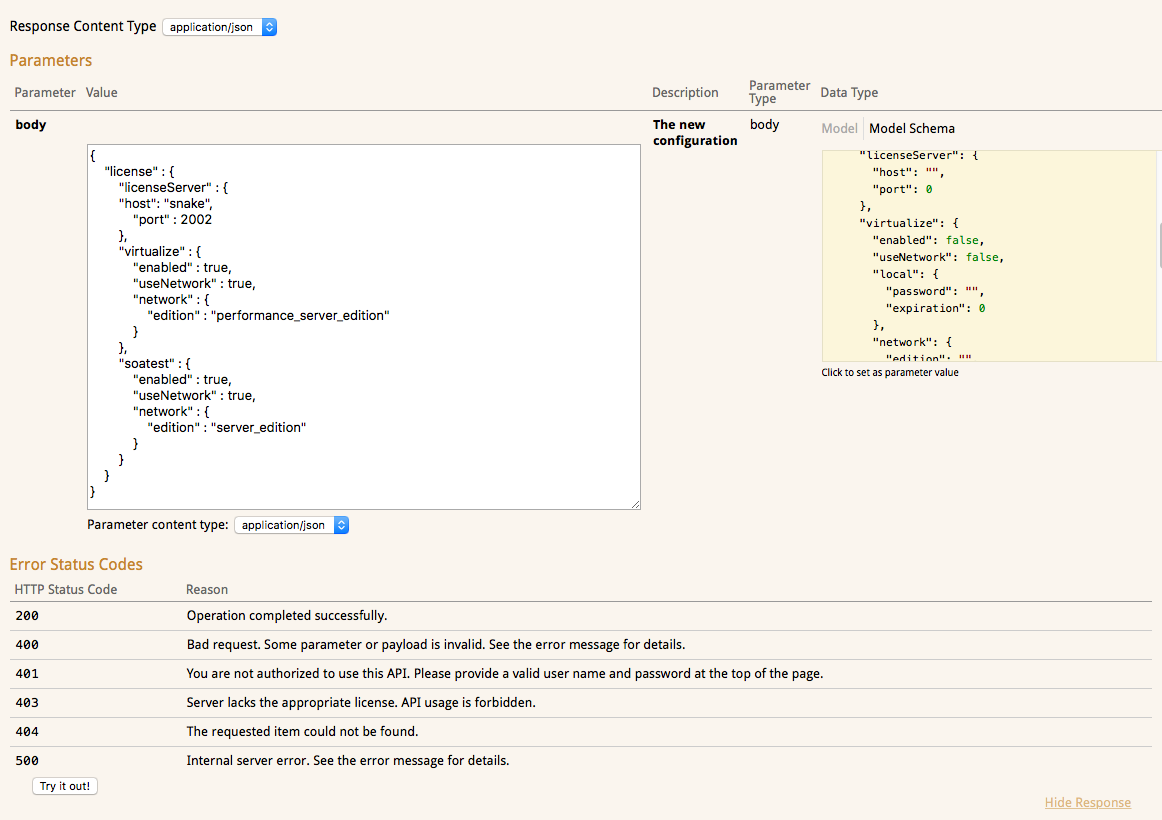
- 入力フィールドに JSON オブジェクトとしてライセンス設定を入力し、[Try it out!] をクリックします。有効なオブジェクトの構造について説明が表示されます。コピーして UI に貼り付けることができる例については Example Requests を参照してください。以下の例はネットワーク ライセンスを設定します。
- ライセンスが有効でパラメーターが正しく設定されている場合、API は適切なレスポンスを返します。
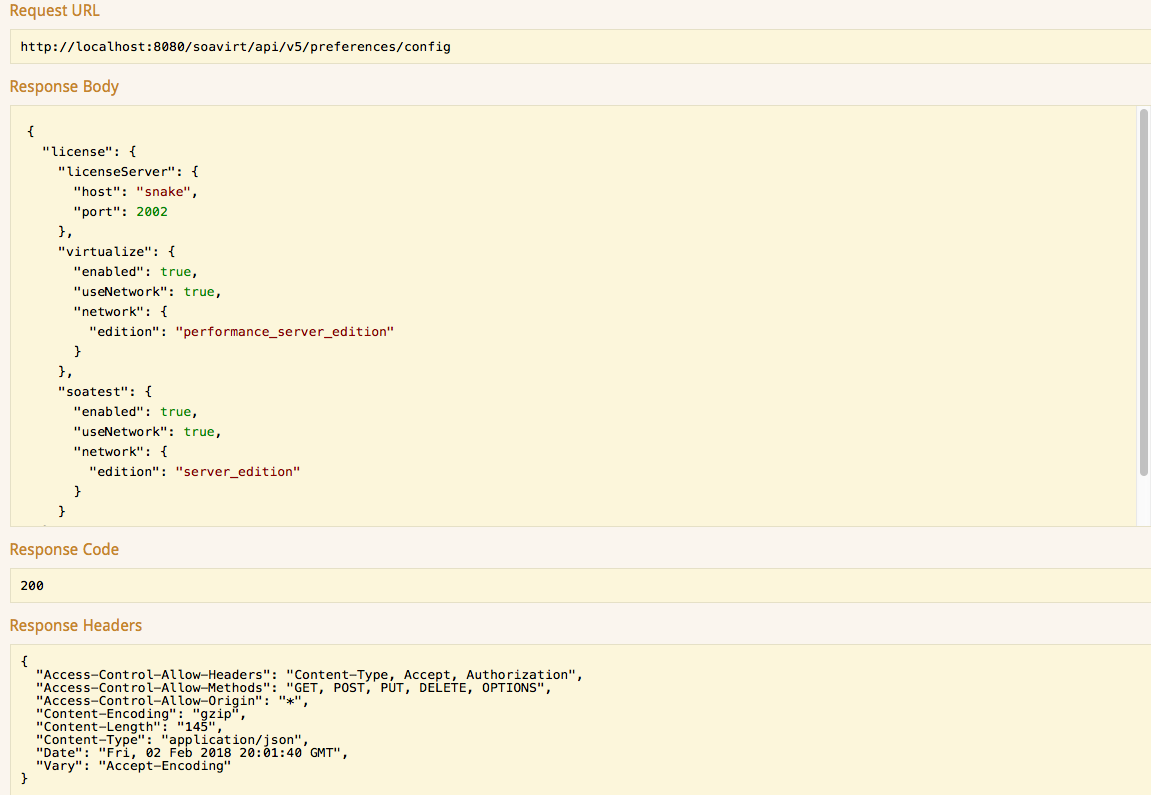
statusエンドポイントに GET リクエストを送信して、ライセンスが正常に設定されたことを確認します:http://<host>:<port>/soavirt/api#!/status/statusGET
これにより、サーバーホストと各ライセンス機能の状態に関する情報が表示されます。
リクエストの例
手始めに、以下の JSON の例をコピーして REST API エンドポイントに貼り付けると便利です。使用するライセンスに合わせて、ホスト、ポート、および機能の設定を変更してください。
{
  "license": {
    "licenseServer": {
      "host": "<your-LS-host>",
      "port": <your-LS-port>
    },
    "virtualize": {
      "enabled": true,
      "useNetwork": true,
      "network": {
        "edition": "performance_server_edition"
      }
    },
    "soatest": {
      "enabled": true,
      "useNetwork": true,
      "network": {
        "edition": "server_edition"
      }
    }
  }
}
{
  "license": {
    "licenseServer": {
      "host": "<your-LS-host>",
      "port": <your-LS-port>
    },
    "virtualize": {
      "enabled": true,
      "useNetwork": true,
      "network": {
        "edition": "custom_edition",
		"customFeatures": [
		"<comma-separated-list-of-features>"
		]
      }
    },
    "soatest": {
      "enabled": true,
      "useNetwork": true,
      "network": {
        "edition": "custom_edition",
 		"customFeatures": [
		"<comma-separated-list-of-features>"
		]
      }
    }
  }
}
{
  "license": {
    "dtp": {
      "host": "<your-DTP-host>",
      "port": <your-DTP-port>,
      "username": "<your-DTP-username>",
      "password": "<your-DTP-password>"
    },
    "virtualize": {
      "enabled": true,
      "useNetwork": true,
      "network": {
        "edition": "performance_server_edition"
      }
    }
  }
}
{
  "license": {
    "dtp": {
      "host": "<your-DTP-host>",
      "port": <your-DTP-port>,
      "username": "<your-DTP-username>",
      "password": "<your-DTP-password>"
    },
    "virtualize": {
      "enabled": true,
      "useNetwork": true,
      "network": {
        "edition": "performance_server_edition"
      }
    },
    "soatest": {
      "enabled": true,
      "useNetwork": true,
      "network": {
        "edition": "server_edition"
      }
    }
  }
}
