You can clone an existing JUnit Selenium test as a parameterized test. Literal values passed to the WebDriver sendKeys method will be parameterized in the newly created parameterized test. Recommendations from parameterized JUnit 5 tests will be based on the last set of parameters only. Self-healing for parameterized JUnit 5 tests is not supported.
Usage
Right-click on a test and choose Clone as Parameterized.
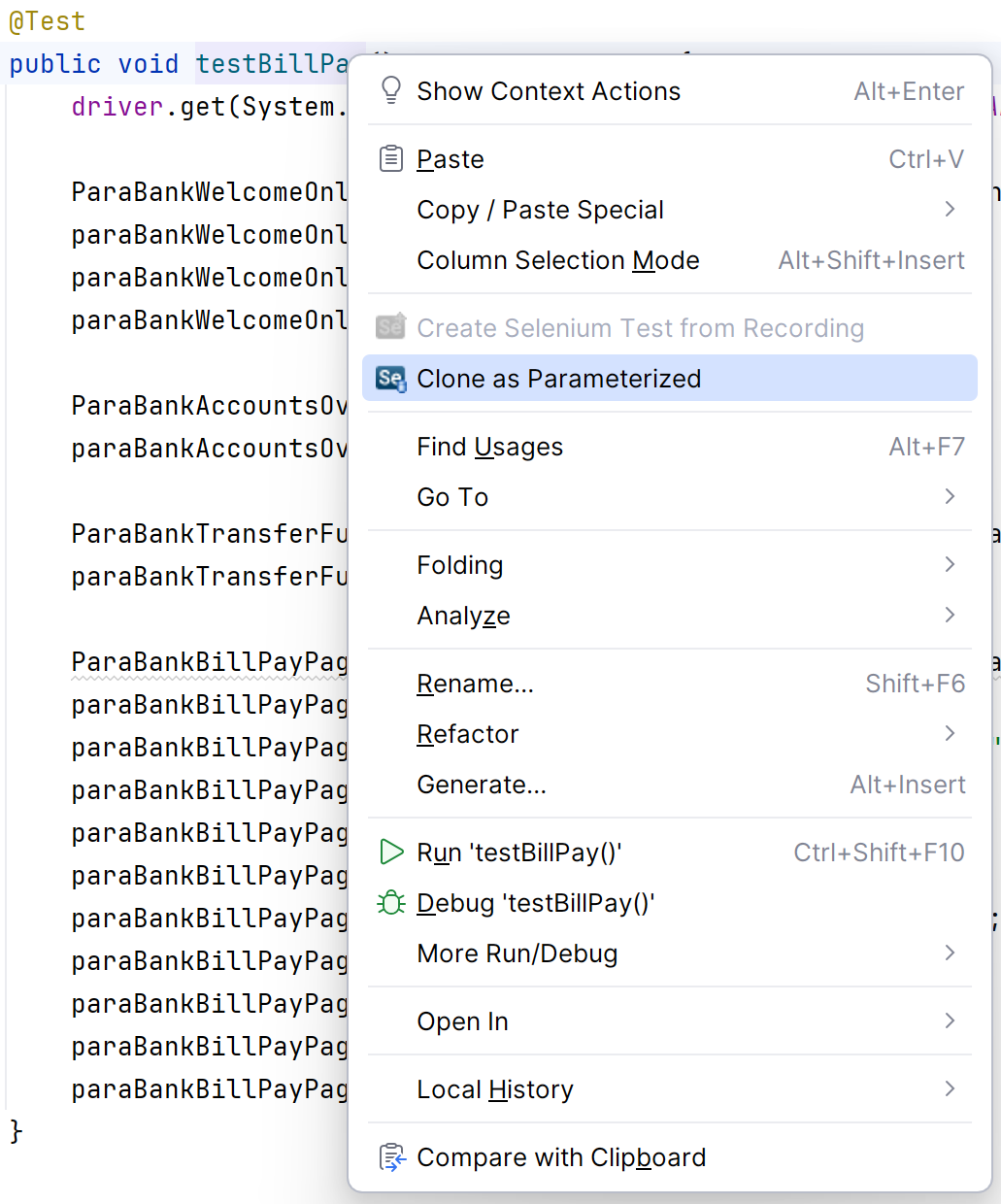
Literal values passed to the WebDriver sendKeys method will be parameterized in the newly created parameterized test. The following types of values are supported:
- Inline literal values
- static constant
- enum value
- local variable with literal value passed to test method
Example
The following test has two string values at lines 14 and 15:
/**
	 * Name: parabank-check-account
	 * Recording file: parabank-check-account.json
	 *
	 * Parasoft recorded Selenium test on Tue Jun 23 2020 15:11:20 GMT-0700 (Pacific Daylight Time)
	 */
	@Test
	public void testParabankcheckaccount() throws Throwable {
		driver.get(System.getProperty("PARABANK_BASE_URL", PARABANK_BASE_URL)
				+ "/parabank/index.htm;jsessionid=02E418F8743E5AD30034D686C5B298FC");

		ParaBankWelcomeOnlineBankingPage paraBankWelcomeOnlineBankingPage = new ParaBankWelcomeOnlineBankingPage(
				driver);
		paraBankWelcomeOnlineBankingPage.setUsernameField("john");
		paraBankWelcomeOnlineBankingPage.setPasswordField("demo");
		paraBankWelcomeOnlineBankingPage.clickLogInButton();
The cloned parameterized test passes the values as parameters text={0} and text={1}:
	/**
	 * Parasoft Selenic: Test cloned from
	 * com.parabank.test.checkAccountTest#testParabankcheckaccount()
	 *
	 * @see com.parabank.test.checkAccountTest#testParabankcheckaccount()
	 * @author atrujillo
	 */
	@ParameterizedTest
	@MethodSource("testParabankcheckaccount2_Parameters")
	public void testParabankcheckaccount2(String text, String text2) throws Throwable {
		driver.get(System.getProperty("PARABANK_BASE_URL", PARABANK_BASE_URL)
				+ "/parabank/index.htm;jsessionid=02E418F8743E5AD30034D686C5B298FC");

		ParaBankWelcomeOnlineBankingPage paraBankWelcomeOnlineBankingPage = new ParaBankWelcomeOnlineBankingPage(
				driver);
		paraBankWelcomeOnlineBankingPage.setUsernameField(text);
		paraBankWelcomeOnlineBankingPage.setPasswordField(text2);
		paraBankWelcomeOnlineBankingPage.clickLogInButton();

		ParaBankAccountsOverviewPage paraBankAccountsOverviewPage = new ParaBankAccountsOverviewPage(driver);
		paraBankAccountsOverviewPage.clickAccountsOverviewLink();
		paraBankAccountsOverviewPage.clickLink();

		ParaBankAccountActivityPage paraBankAccountActivityPage = new ParaBankAccountActivityPage(driver);
		paraBankAccountActivityPage.selectMonthDropdown("January");
		paraBankAccountActivityPage.selectTransactionTypeDropdown("Credit");
		paraBankAccountActivityPage.clickGoButton();
	}

	// Parasoft Selenic: Initialize test parameters
	@SuppressWarnings("unused")
	private static Stream<Arguments> testParabankcheckaccount2_Parameters() throws Throwable {
		// Parameters: text={0}, text2={1}
		return Stream.of(arguments("john", "demo"));
	}
