You can use an LLM with your LLM provider account to assist you in creating tests from an OpenAPI/Swagger definition in SOAtest or to power the AI Assistant, which can also help you create tests, virtual assets, and data sources. You must configure SOAtest & Virtualize to be able to use your LLM provider account in the LLM Provider preferences before you can take advantage of these features. OpenAI, Azure OpenAI, and other LLM providers with similar functionality are supported. See LLM Provider preferences to determine whether or not your LLM provider can be used.
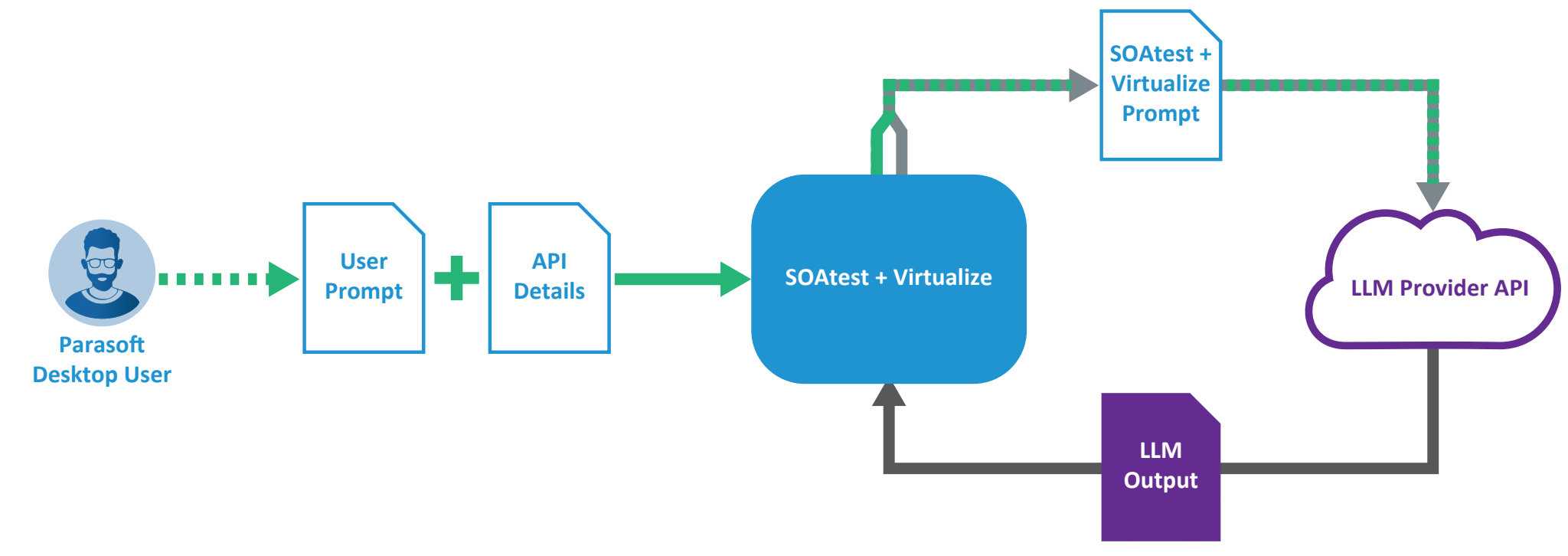
The SOAtest & Virtualize-AI integration uses the LLM provider's REST API over HTTPS/TLS. When creating tests or virtual assets, it collects summarized information from the user-provided OpenAPI document and includes it with a user-defined prompt plus SOAtest & Virtualize's custom prompts in the requests to the LLM.
AI Assistant uses custom prompts in its requests to the LLM. Below are common examples of additional information sent to the LLM, depending on what is requested:
- User prompts
- Summarized information from Parasoft documentation
- Details related to API being tested or virtualized
- Summarized service definition file plus the user prompt for test and virtual asset creation
- Summarized field names from the payload plus the user prompts for parameterization
- Default Request payload plus the SOAtest & Virtualize prompt for value filling
- User prompts for data source generation
The AI Assertor and AI Data Bank tools send the document that the tool is configured to operate on plus the user prompts to determine what to validate or extract.
The diagram below illustrates what and how SOAtest & Virtualize communicates with an LLM.