The general Parasoft Plugin and the Parasoft C/C++test Plugin must both be installed:
- Unpack the installation package in any directory.
- Choose Help > Install New Software in the Eclipse menu bar. For older versions of Eclipse, it is recommended that you:
- Disable the Contact all update sites during install to find required software option to prevent additional updates from being installed with the Parasoft Plugin, or
- Carefully review the list of Available Software Sites, ensuring that only update sites specific to the selected Eclipse version are enabled.
- Click Add.
Click Archive and choose
cpptest_plugin_<version>_eclipse.ziplocated in<INSTALL_DIR>\integration\eclipse- Select the Parasoft C/C++test plugins and complete the installation process. This will install both the Parasoft Plugin and the Parasoft C/C++test Plugin.
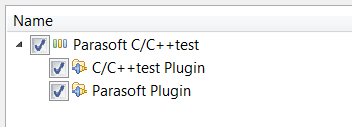
- Restart Eclipse when prompted.
