You can enable or disable all event reporting for a particular Virtualize server directly from CTP or from the Virtualize desktop. When event reporting is disabled, it will not be possible to monitor any events for associated assets (for example, proxies or virtual assets deployed on this server) from either CTP or Virtualize desktop. You can also disconnect all monitoring clients from the Virtualize server, freeing up resources that might be affecting server performance.
Disable Event Monitoring
To use CTP to stop all event monitoring on a specific Virtualize server:
- Open the appropriate Virtualize server page by going to the Service Virtualization module, choosing Virtualize Servers, then clicking the server.
- From the page-level action menu, choose Disable Monitoring Service.
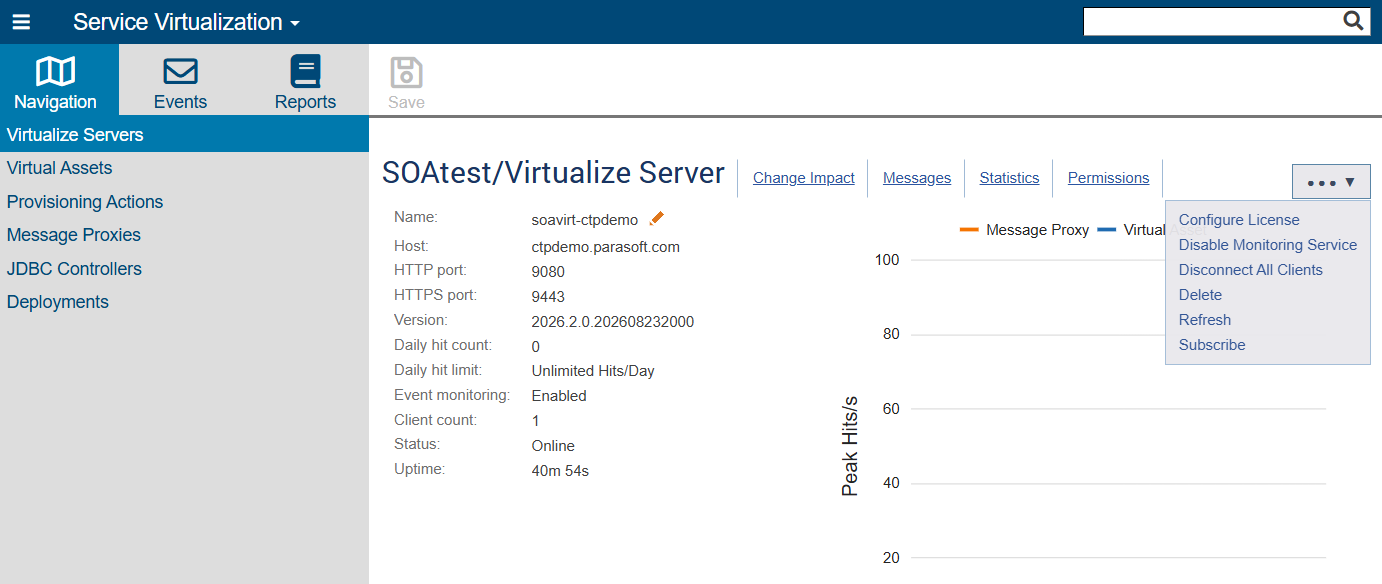
If any assets from this server are currently being monitored in CTP, CTP will open a dialog to alert you and confirm that you want to proceed.
Enable Event Monitoring
To use CTP to re-enable event monitoring on a specific Virtualize server:
- Open the appropriate Virtualize server page by going to the Service Virtualization module, choosing Virtualize Servers, then clicking the server.
- From the page-level action menu, choose Enable Monitoring Service.
Disconnect Event Monitoring Clients
To use CTP to disconnect all event monitoring clients on a specific Virtualize server:
- Open the appropriate Virtualize server page by going to the Service Virtualization module, choosing Virtualize Servers, then clicking the server. You can see how many clients are currently connected to the server under Client count.
- From the page-level action menu, choose Disconnect All Clients. Note that you can only disconnect all clients; it is not possible to choose which clients to disconnect.