It is common for SOA applications to be developed and maintained by different teams under different environments.
For example, a developer may start with tests on a local server. Then, as the app is deployed to a development build server, the same tests need to be executed against that server. Later, QA and testing teams need to run the same regression tests on their own integration server.
Parasoft SOAtest’s environments management feature facilitates such tasks because reusing and sharing test assets is critical for achieving a highly efficient process. One common way is to have SOAtest configure automatically generated tests for environments, then modify environment settings so that the generated tests can be more easily used in different environments—without requiring any changes to the actual tests.
To create a new test suite with preconfigured environment variables:
- Right-click the project from the previous exercises and choose Add New > Test (.tst) File.
- Enter a name for the file and click Next.
- Choose SOA > WSDL and click Next.
- Enter
http://localhost:8080/parabank/services/store-01?wsdl in the WSDL URL field. - Ensure that Create Functional Tests From the WSDL is enabled.
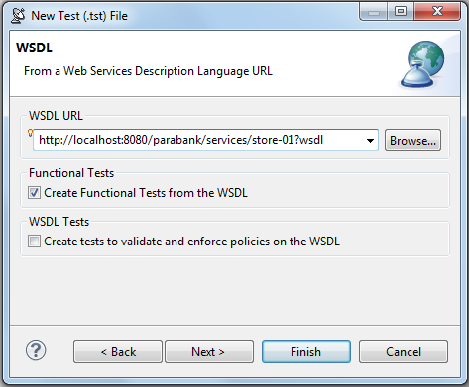
- Click Next twice to advance to the Create Environment page.
- Enable Configure environment settings for your project, enter
Default Store Environment in the Name field, enable Both under Variable Types, then click Finish.
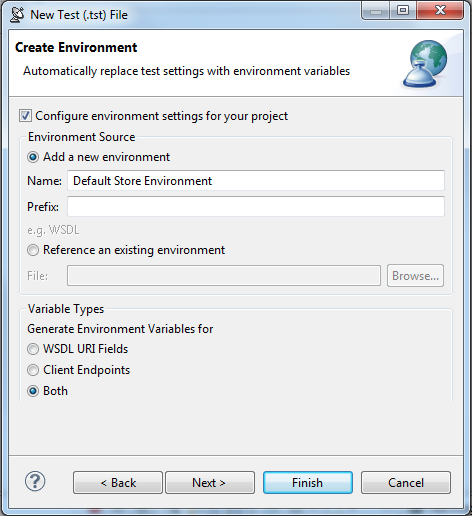
A new Test Suite: Test Suite node appears in the Test Case Explorer tab and new environment variables are added to the Default Store Environment node. - Double-click the Default Store Environment node that was added to the new test suite. Notice how the environment configuration now includes variables for the WSDL and Endpoint.
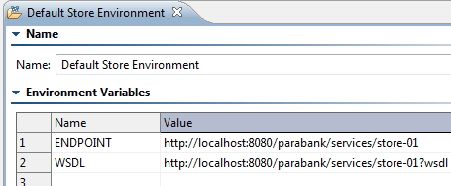
- Open one of the generated SOAP Client tests and notice that the same variables shown above are referenced by name. For example:


- Run the getItemByTitle test. The SOAP messages will be sent to the original store service.

To configure SOAtest to run these same tests in another environment, create a new environment configuration:
- Right-click the Environments node and select New Environment.
- In the New Environment configuration panel, enter
Echo Environment in the Name field. - In the table, enter the following variable names and values:
- ENDPOINT:
http://localhost:8080/parabank/echo.jsp - WSDL:
http://localhost:8080/parabank/services/store-01?wsdl

- Click Save to save the new environment.
- Right-click the new Echo Environment node and select Set as Active Environment. This will set that new environment as the new configuration for the test project.
- Run the tests. The SOAP messages will now be sent to echo.jsp instead of the original store service.

Note that:
- Environment configurations such as Default Store Environment and Echo Environment can be exported and imported into external XML files, as well as uploaded and referenced to the Parasoft Team Server.
- Environment variables such as ${ENDPOINT} and ${WSDL} can be referenced from most of the fields in the test settings GUI, not just URL fields.
- In the data source editor, use the
soa_env prefix to reference environment variables. For example, ${soa_env:Variablel}/calc_values.xlsx
Environments in Web Scenarios
Environments can also be deployed to assist in web scenario execution, in much the same way that they can be used in service functional testing.
When a web functional test is created, a new environment is created. By default, it contains the base URL for the web site you are testing (named {DOMAIN_COM_BASE_URL}). You can create additional environments that can redirect the test initiation to another base URL (for example, if you are testing a web application that is deployed locally).
Switching Environments for Automated Regression Testing
One of the greatest benefit of environments is the ability to rerun the same regression suites from the command line without having to open the SOAtest GUI and modify host or URL settings.
For an example of how to do this, see Applying an Environment Configuration to a Regression Test from the Command Line.