The Scope tab contains a set of filters that you can configure to define the parts of the code that the test configuration should cover. You must connect C/C++test to source control in order to collect scope information. Click Save to preserve any changes you make on this tab.
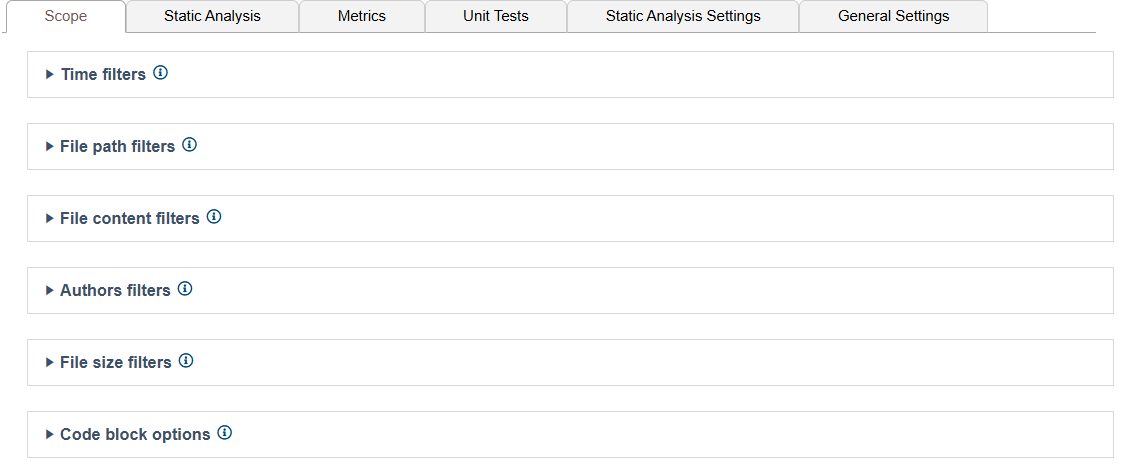
Time Filters
Expand the Time filters settings to set time-based filters at the file or line level. The time filters enable you to restrict the scope of analysis to a specific date range or period. If the scope.scontrol setting is set to true and the source control settings for C/C++test are configured, the modification time is set from the source control history. If scope.local is set to true, then the modification time is set form the file system of the machine running analysis. See Scope and Authorship Settings for details.

You can configure the following settings:
File-level settings
| Check all files | Default. Enable this option to include all files in the scope of the analysis the user has access to. |
|---|---|
| Check locally-modified files | Enable this option to only check locally modified files. For this option to take effect, ensure that connection to your source control system is properly configured and authorship is computed based on data from that source control system. See the prerequisites in Defining Additional Scope Filters. |
| Check files modified within a date range | Enable this option and specify a date range to include in the scope. Files that were modified or added within the specified range will be checked. |
| Check files modified within last n days | Enable this option and specify the number of days to include in the scope. Files that were modified or added within the specified number of days will be checked. |
| Check files modified between the current working branch and | Enable this option to only analyze files that are different between the current working branch and the reference branch. This allows you to speed up analysis by excluding unchanged files from the test scope. You need to configure one of the following options to specify which branch is used as reference:
For this option to take effect, ensure that connection to your source control system is properly configured and authorship is computed based on data from that source control system. See the prerequisites in Defining Additional Scope Filters. This option is only supported for Git SCM. |
 If a scope filter is configured in both Test Configuration Editor and the .properties file, the configuration specified in the .properties file will override the settings configured in the GUI. See Defining Additional Scope Filters for details.
Line-level Settings
| Check all lines | Default. Enable this option to include all lines of code in the scope of the analysis the user has access to. |
|---|---|
| Check locally-modified lines | Enable this option to only check locally modified lines. For this option to take effect, ensure that connection to your source control system is properly configured and authorship is computed based on data from that source control system. See Configuring Authorship and Connecting to Source Control. |
| Check lines modified since | Enable this option and specify a cut-off date to include in the scope. Lines of code that were modified or added within the specified range will be checked. |
| Check lines modified within last n days | Enable this option and specify the number of days to include in the scope. Lines of code that were modified or added within the specified number of days will be checked. |
File Path Filters
Expand the File path filters section to specify file path patterns to include and/or exclude from analysis. Relative paths within a workspace/solution.

The following settings are available:
| Accepted paths (wildcard) | Specify a comma-separated list of files to include. Wildcards are supported (e.g., *.cpp, *.java, *.cs). |
|---|---|
| Rejected paths (wildcard) | Specify a comma-separated list of files to exclude. Wildcards are supported (e.g., *.cpp, *.java, *.cs). |
Expand the Advanced discloser triangle to use regular expressions to set the file path filters. The following settings are available:
| Accepted paths (regex) | Specify a regular expression. Files that match the pattern will be included in the analysis. |
|---|---|
| Rejected paths (regex) | Specify a regular expression. Files that match the pattern will be excluded in the analysis. |
File Content Filters
Expand the File content filters section to specify regular expressions that exclude specific types of files based on content, for example, auto-generated files.
File filtering takes priority over code block filtering
A potential conflict may occur if you use both filter types at the same time.

Author Filters
Expand the Author filters section to limit the scope of analysis to specific authors. If the scope.scontrol setting is set to true and the source control settings are configured, then file authorship is taken from the source control system. If the scope.xmlmap is set to true and the XML map settings are configured, then files authorship is taken from the map.

The following options are available:
| Include only files owned by authors | Enable this option to only include files owned by the authors specified in the List of authors field. |
|---|---|
| Include only lines owned by authors | Enable this option to only include lines of code owned by the authors specified in the List of authors field. |
| List of authors | Specify a comma-separated list of authors whose code should be analyzed. |
File Size Filters
Expand the File size filters section to limit the scope of analysis based on file size.

Code Block Options
Expand the Code block options section to define specific blocks of code to include or exclude from the analysis.
File filtering takes priority over code block filtering
A potential conflict may occur if you use both filter types at the same time.

| Include only lines in certain blocks | Enable this option to include only the code defined by the Starting and Ending marker fields in the analysis. |
|---|---|
| Starting marker | Specify a regular expression to mark the start of the code block that should be analyzed. |
| Ending marker | Specify a regular expression to mark the beginning of the code block that should be analyzed. |
| Skip files without these markers | Enable this option skip files that do not include patterns that match the Starting and Ending marker fields. |
