...
- [parasoft_exclude]
- [exclude]
The null and exclude values are used to shape the response payload. For example, say you have a payload that is parameterized that looks like this:
| Code Block |
|---|
{
  "book" : {
    "title" : "${title}",
    "isbn" : "${isbn}"
  }
} |
Normally it would get the title and isbn values from the data repository and create a payload like this:
| Code Block |
|---|
{
  "book" : {
    "title" : "Best Homemade Cookbook",
    "isbn" : "1234-abfh-9876"
  }
} |
However, if the isbn value is set to [null] or [parasoft_null] in the data repository, the payload would be:
| Code Block |
|---|
{
  "book" : {
    "title" : "Best Homemade Cookbook",
    "isbn" : null
  }
} |
And if the isbn value is set to [exclude] or For details on how [parasoft_exclude] works with URL parameter data source correlations, see Matching on Absent/Empty Fields and Parameters. in the data repository, the payload would be:
| Code Block | ||
|---|---|---|
| ||
{
  "book" : {
    "title" : "Best Homemade Cookbook"
  }
} |
Adding the Data Repository Tool
...
| Initialize data from |
|
|---|---|
| Initialize structure from |
When specifying WSDLs and schemas, specify the definition file and choose the data type definition from the Type menu.
|
| Join column | If initializing from an Excel file, specify the name of the column that indicates relationships across Excel sheets in the Join column field. By default, the Join column is the ParentIndex column, but you can also point to another column that contains values for referencing the parent row. See Defining the Structureadditional for additional information. |

Configuring the Data Repository Tool
...
Select the Data Repository tool that and click Run in the toolbar.
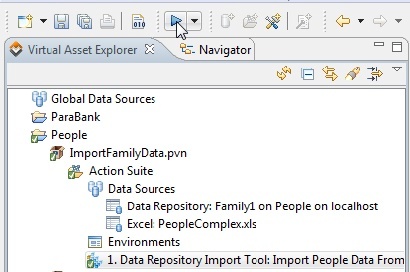
Details on the import will be reported in the Console view.
...
Any problems with the import will be reported in the progress view. For instance, the following message might occur if you try to import data into a Repository Server that is not currently running.
