...
- Java 17 or later. Oracle and OpenJDK versions are supported. Hit Statistics and Event Messages require Java 21.
JAVA_HOME must point to the JRE/JDK. You can run
echo $JAVA_HOME(Linux) orecho %JAVA_HOME%(Windows) to verify this.PATH must include the path to java executable. You can run
javato verify that the executable is found.CTP downloaded (via download link). You can request a download link by sending an email to your Parasoft representative.
Linux (Red Hat)
- Download Apache Tomcat 10.1 11 from http://tomcat.apache.org/.
- Log in to the system as
root. - Extract Tomcat.
tar –zxvf apache-tomcat-<version>
This will create a new folder containing Tomcat. - (Recommended) Move the extracted folder to a common installation location, such as
/opt/tomcat.
...
- Download the Apache Tomcat 10.1 3211 32-bit/64-bit Windows Service Installer from
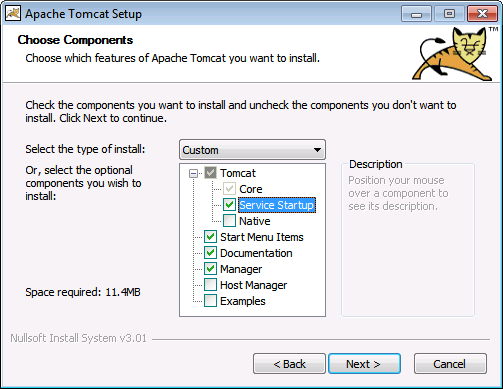
http://tomcat.apache.org/ - Run the installer. Choose Service Startup during installation.
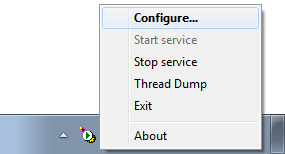
- After installation, open the Tomcat configuration controls from the system tray.
- For Java Options, set the maximum size of the Metaspace using
-XX:MaxMetaspaceSize=256m
(Java Options are separated by new lines, not spaces) and set the maximum heap size to 768 MB.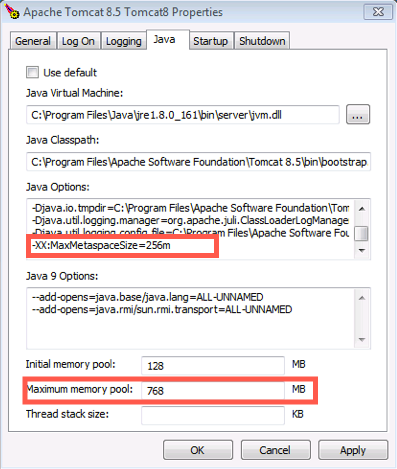
...
Standard Tomcat access log parameters are supported. See https://tomcat.apache.org/tomcat-1011.10-doc/config/valve.html#Access_Logging for more information.
Additional Configuration for UTF-8 Encoding
...