...
- Run a test and click the Quality Tasks tab.
- Fully expand the MISRA C 2004 folder. This expression that violates the rule may cause a bug, but it’s accepted practice for many developers. In such cases, a reported violation can be suppressed.
- Right-click the rule description (Assignment operators shall not be used in expressions that yield a Boolean value) and select Suppress Task.
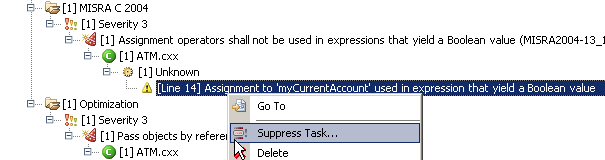
This removes the violation from the report and creates an entry for it in the suppressions set. - Provide an explanation why the suppression was applied. Enter
Not relevant to my codefor this exercise.
- Select a location for the suppression and click OK. When suppressions are defined in source code:
- The same suppressions are applied whenever you or a team member tests that code.
- You can add code comments for the suppression to further explain the reason you suppressed the rule violation.
- You gain fine-grained control over which rules are enforced at the file, class, or line level.
- Click the Suppressions tab to view existing suppressions. If the suppressions tab is not visible, select Parasoft > Show View > Suppressions. You will see an entry that corresponds to the specified suppression in the file
ATM.cxx.
...