...
| Info | ||
|---|---|---|
| ||
If you are using a separately installed MySQL, Oracle, or Oracle PostgreSQL database (rather than the embedded HyperSQL database), you must setup the database before proceeding. See Setting Up the Database (MySQL, Oracle, or OraclePostgreSQL) for details. |
Starting CTP for the First Time
...
- Coverage tier: Determines the number of coverage agents allowed. See Connecting CTP to Coverage Agents for more information about coverage agents. By default, CTP allows up to 5 coverage agents. More agents are available with higher coverage tiers as detailed in the table below:
Coverage tier Number of coverage agents Default 5 1 25 2 50 3 75 4 100 5 150 6 300 7 500 - User limit: Determines the number of active user accounts allowed on CTP. See Reviewing and Modifying Configuration Settings User Accounts for information about deactivating inactive accounts.
...
If you are using the embedded HyperSQL database (rather than a separately installed MySQL, Oracle, or Oracle PostgreSQL database):
- Choose HyperSQL as the Type.
- Enter the path to where the database files should be saved on the host that runs Apache Tomcat. Prepend a forward slash ‘/’ to make the path absolute in the file system.
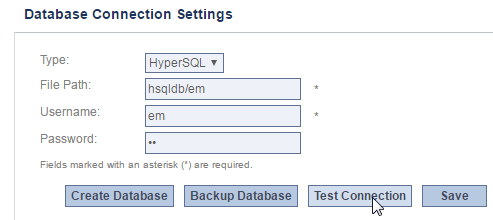
- If the database files do not yet exist, click Create Database to create a complete HyperSQL database.
...
CTP does not ship with JDBC driver libraries for MySQL, Oracle, or OraclePostgreSQL. The Database Configuration page will instruct you to copy a JDBC connector jar file to the WEB-INF/lib/ folder on the application server.
...
For Oracle databases, copy the ojdbc jar from http://www.oracle.com/technetwork/database/features/jdbc/index-091264.html to the same WEB-INF/lib/ folder.
For PostgreSQL databases, download the postgresql.jar from https://jdbc.postgresql.org/ to the same WEB-INF/lib/ folder.
Configuring CTP Session Timeout
...